> For the complete documentation index, see [llms.txt](https://docs.struct.com/llms.txt). Markdown versions of documentation pages are available by appending `.md` to page URLs; this page is available as [Markdown](https://docs.struct.com/tutorials/guides/how-to-use-webhooks/how-to-digest-webhook-requests.md).
# How to digest webhook requests
A guide on how to digest webhook requests.
## Webhook requests
Once you have a URL set up for your webhook, it will send a request to that URL, whenever a specified event is triggered. A webhook request consists of two main parts: a header and a body:
* Header: Contains metadata that describes the nature of the request, such as what event was triggered.
* Body: Contains data related to the event, such as updated attributes on variants.
When your endpoint receives the webhook request, it should evaluate the contents of the header and body to process the event appropriately. The endpoint should then respond with an HTTP status code to indicate the result:
* 200 OK - The request was recieved and processed successfully.
* 400 Bad Request - The request could not be processed.
Depending on the situation, other response codes like 401 (Unauthorized) or 403 (Forbidden) may also be used.
## Example of a webhook
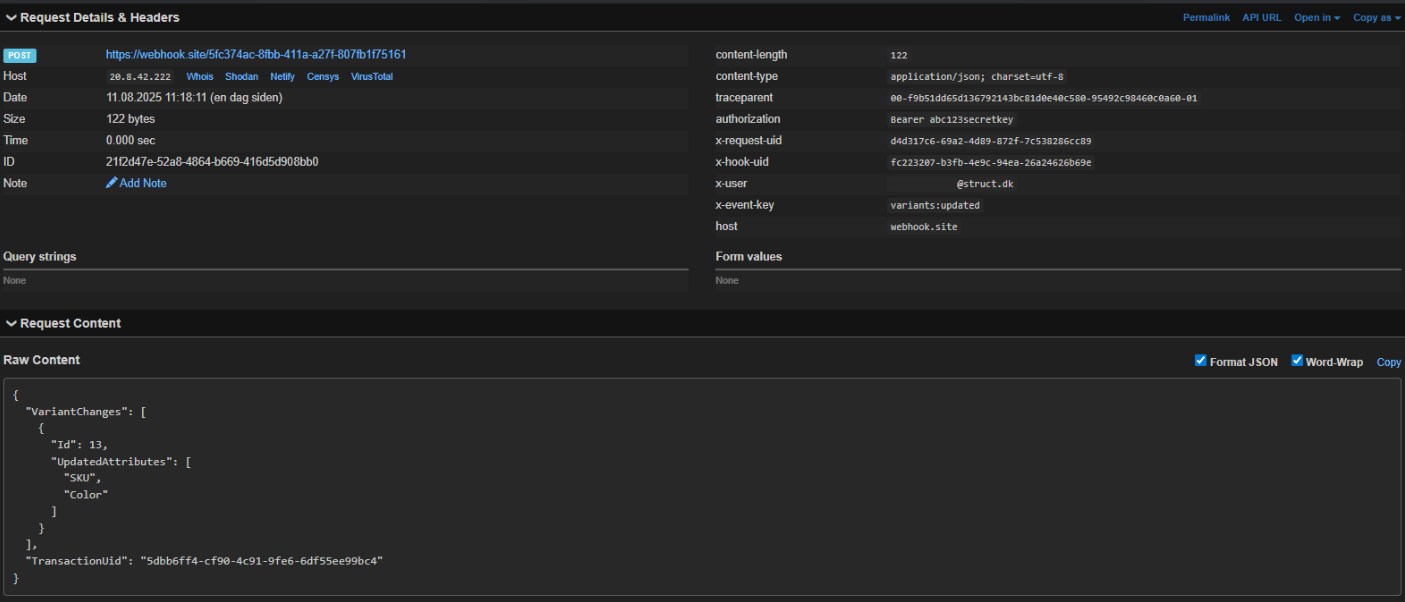
The image below illustrates a typical webhook request. The header includes specific metadata such as:
* **X-Request-Uid:** Unique ID for the specific webhook request.
* **X-Hook-Uid:** Unique ID for the configured webhook in Struct PIM.
* **X-User:** Specifies the origin of the request.
* **X-Event-Key:** Denotes the event type that triggered the webhook, which in this case, is a "variants:updated" event.
In the image below we see an example of what a request could look like. In this case it includes data such as the ID of a modified variant.
Because this is a detailed change request, it also shows which attributes were updated. For instance, the example below illustrates that the attributes "Sku" and "Color" of the variant were updated.
Webhook request in webhook.site
While developing and testing handling of webhooks, [webhook.site](https://webhook.site/) can also be a valuable resource. Go to the site, copy the unique webhook link and paste it into the relevant webhook settings in Struct PIM.
Upon triggering the webhook in Struct PIM, webhook.site is live updated for you to examine the request and e.g. copy it into Postman for testing on a local machine. As it is a free service, the link will only work for a given number of requests after which you will have to generate a new link.
---
# Agent Instructions
This documentation is published with GitBook. GitBook is the documentation platform designed so that both humans and AI agents can read, navigate, and reason over technical content effectively. Learn more at gitbook.com.
## Querying This Documentation
If you need additional information that is not directly available in this page, you can query the documentation by asking a question.
Perform an HTTP GET request on the following URL with the `ask` and `goal` query parameters:
```
GET https://docs.struct.com/tutorials/guides/how-to-use-webhooks/how-to-digest-webhook-requests.md?ask=&goal=
```
`ask` is the immediate question: it should be specific, self-contained, and written in natural language.
`goal` is what the user is ultimately trying to achieve, the reason they need the answer. Sharing it helps GitBook give you a better, more relevant answer. A goal is most helpful when it describes the outcome the user wants rather than restating the question. For example, with `ask=how do I create an API token`, a goal like `automate deployments from our CI pipeline` lets GitBook tailor the answer to that use case.
The response will contain a direct answer to the question and relevant excerpts and sources from the documentation.
Use this mechanism when the answer is not explicitly present in the current page, you need clarification or additional context, or you want to retrieve related documentation sections.