# How to create a PowerPoint presentation with publications

### Why use PowerPoint?

Modern product management moves fast, and your sales tools need to keep up. Traditionally, creating product presentations meant hours of copy-pasting specs and images into static slides - only for that data to become outdated the moment a price changed.

We have integrated PowerPoint into Publications to automate this process. By linking your slides directly to your Struct PIM data, you can generate presentation-ready slides that are always accurate, beautifully formatted, and ready for the boardroom in a single click.

In this guide, we will go through how to set up a publication that exports a PowerPoints presentation. The source code will be available down below.

### Creating the template

Head over to 'Publications' > 'Publication templates', and click on 'Create publication template' in the top right corner of the page.

<figure><img src="/files/zpqxRxnYvApOWM4BlSzN" alt="The button to create a new publication template"><figcaption><p>The button to create a new publication template</p></figcaption></figure>

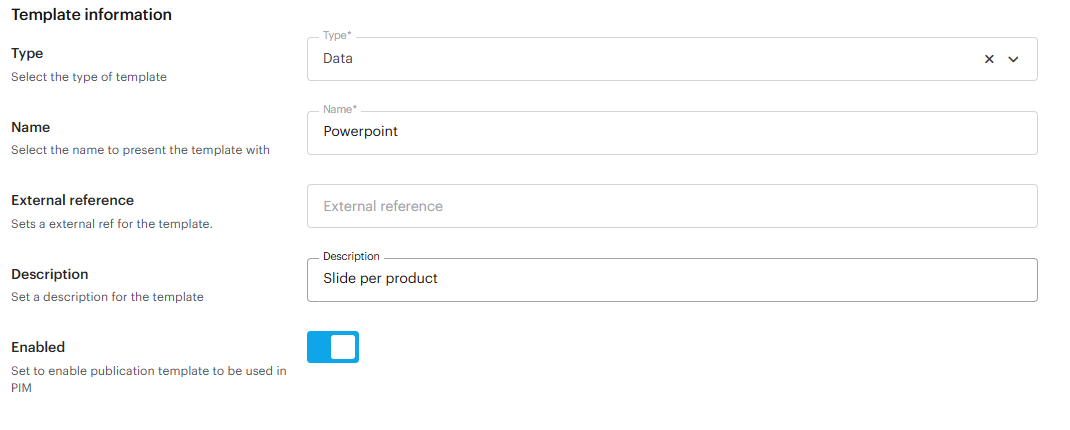
Set the type to 'Data'.

<figure><img src="/files/RogRItpQD8EH6IPEn1aL" alt="The template information for the publication template"><figcaption><p>The template information for the publication template</p></figcaption></figure>

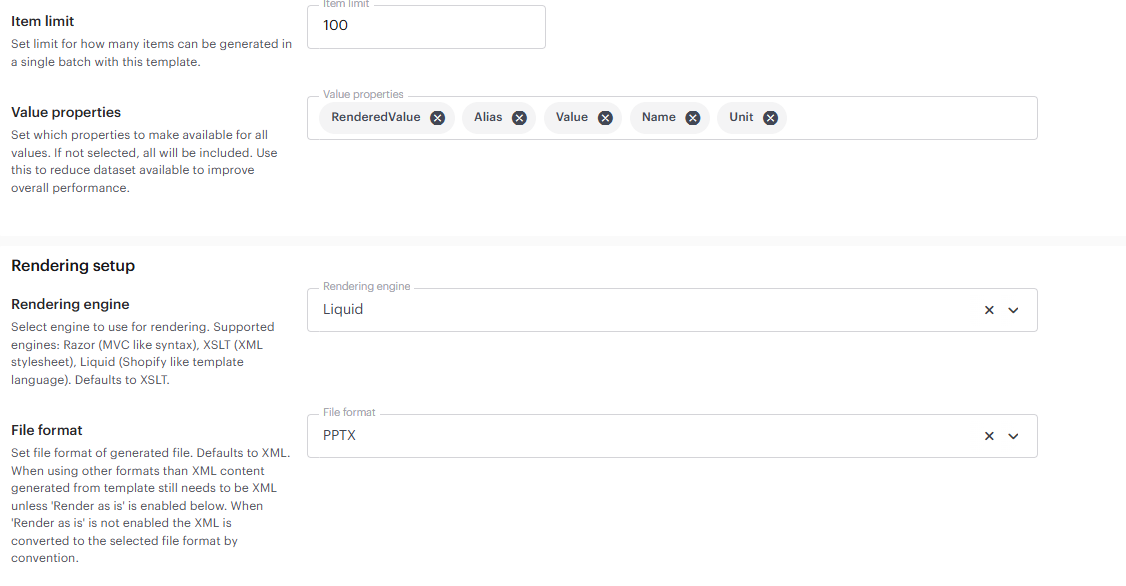
Set the rendering engine to 'Liquid', and the file format to 'PPTX'. You can choose the other rendering engines as well, but for the sake of this guide we will be writing in Liquid.

<figure><img src="/files/gCjdzYbKjQMLCMUxxJJz" alt="The rendering setup for the publication template"><figcaption><p>The rendering setup for the publication template</p></figcaption></figure>

When you have set everything up, save the template, and head out to the publication template overview.&#x20;

Find the template that you just created and click the <i class="fa-eye">:eye:</i>-icon to open the designer. Inside the designer, you are now able to write Liquid.&#x20;

For this guide, use the following code snippet:

{% code title="Liquid" lineNumbers="true" expandable="true" %}

```liquid
{% for productModel in Products %}
{% assign product = productModel.AttributeValues %}
  <slide title="Product Overview" transition="fade">
    <!-- Product Title -->
    <element x="100" y="40" width="800" height="60">
      <content>
        <paragraph><![CDATA[{{ product.Name.RenderedValue }}]]></paragraph>
      </content>
      <style fontName="Segoe UI" fontSize="24" bold="true" align="center" color="#1B263B" />
    </element>

    <!-- Intro Text -->
    <element x="100" y="90" width="800" height="60">
      <content>
        <paragraph><![CDATA[{{ product.ShortDescription.RenderedValue }}]]></paragraph>
      </content>
      <style fontName="Segoe UI" fontSize="12" italic="true" align="center" color="#333333" />
    </element>

    <!-- Long Description with Bullets -->
    <element x="100" y="160" width="450" height="400">
      <content>
        <paragraph>
          <![CDATA[{{ product.LongDescription.RenderedValue }}]]>
        </paragraph>
        <paragraph>
          
        </paragraph>
        {% for usp in product.USP.Values %}
        <bullet><![CDATA[{{ usp.RenderedValue }}]]></bullet>
        {% endfor %}
        {% for tag in product.CharacteristicaTags.Values %}
        <bullet><![CDATA[{{ tag.RenderedValue }}]]></bullet>
        {% endfor %}
      </content>
      <style fontName="Segoe UI" fontSize="10" align="left" color="#333333" />
    </element>

    <!-- Product Image -->
    <element x="580" y="160" width="300" height="270">
      <content>
        <image src="{{product.PrimaryImage.RenderedValue}}" format="width=600&height=540&format=jpg&bgcolor=ffffff" tag="image"></image>
      </content>
    </element>

    <!-- Feature Table -->
    <element x="580" y="440" width="300" height="180">
      <content>
        <table>
          <headers>
            <cell>Feature</cell>
            <cell>Details</cell>
          </headers>
          <rows>
          {% if product.Year.RenderedValue %}
            <row><cell>{{product.Year.Name}}</cell><cell>{{product.Year.RenderedValue}}</cell></row>
          {% endif %}
          {% if product.Alcohol.RenderedValue %}
            <row><cell>{{product.Alcohol.Name}}</cell><cell>{{product.Alcohol.RenderedValue}} {{product.Alcohol.Unit}}</cell></row>
          {% endif %}
          {% if product.PackagingType.RenderedValue %}
            <row><cell>{{product.PackagingType.Name}}</cell><cell><![CDATA[{{product.PackagingType.RenderedValue}}]]></cell></row>
          {% endif %}
          {% if product.Country.RenderedValue %}
            <row><cell>{{product.Country.Name}}</cell><cell><![CDATA[{{product.Country.RenderedValue}}]]></cell></row>
          {% endif %}
          {% if product.District.RenderedValue %}
            <row><cell>{{product.District.Name}}</cell><cell><![CDATA[{{product.District.RenderedValue}}]]></cell></row>
          {% endif %}          
          {% if product.WineMaker.RenderedValue %}
            <row><cell>{{product.WineMaker.Name}}</cell><cell><![CDATA[{{product.WineMaker.RenderedValue}}]]></cell></row>
          {% endif %}
          {% if product.Bluetooth.Value == true %}
            <row><cell>{{product.Bluetooth.Name}}</cell><cell>Yes</cell></row>
          {% endif %}
           {% if product.BluetoothVersion.RenderedValue %}
            <row><cell>{{product.BluetoothVersion.Name}}</cell><cell>{{product.BluetoothVersion.RenderedValue}}</cell></row>
          {% endif %}
          {% if product.ScanFrequency.RenderedValue %}
            <row><cell>{{product.ScanFrequency.Name}}</cell><cell>{{product.ScanFrequency.RenderedValue}}</cell></row>
          {% endif %}
          {% if product.ColorSystem.RenderedValue %}
            <row><cell>{{product.ColorSystem.Name}}</cell><cell>{{product.ColorSystem.RenderedValue}}</cell></row>
          {% endif %}
         {% if product.ModelNumber.RenderedValue %}
            <row><cell>{{product.ModelNumber.Name}}</cell><cell><![CDATA[{{product.ModelNumber.RenderedValue}}]]></cell></row>
          {% endif %}
          </rows>
        </table>
      </content>
      <style fontName="Segoe UI" fontSize="7" cellpadding="2" align="left" />
    </element>

    <element x="300" y="620" width="300" height="80">
      <content>
        <image src="{{product.Brand.Values[0].SubAttributeValues.Logo.RenderedValue}}" format="width=600&height=160&format=jpg&bgcolor=ffffff" tag="image"></image>
      </content>
    </element>
  </slide>
{% endfor %}

```

{% endcode %}

Finally, ensure you apply the correct base template. This defines the root structure (the `<presentation>` tag), which acts as a signal to the publishing engine. It tells the system to interpret your data as PowerPoint-specific instructions rather than generic XML, ensuring your content is correctly mapped to the slides.

{% code title="XML" lineNumbers="true" %}

```xml
<presentation>
    <content></content>
</presentation>
```

{% endcode %}

You will now be able to export the publication template example as a PowerPoint presentation. To do so, click 'Download' on the right hand side of the designer.

<figure><img src="/files/2LIh7KJRdaJyljLKEfin" alt="Inside the template designer."><figcaption><p>Inside the template designer</p></figcaption></figure>

### Putting it all together

When everything is set up, the PowerPoint should display the product information specified.

<figure><img src="/files/tw23rHXWIOWxcypY4ser" alt="The PowerPoint generated from the Publication template."><figcaption><p>The PowerPoint generated from the Publication template</p></figcaption></figure>

#### Get the code

You can download the example used here and import it inside your own PIM instance.

{% file src="/files/v7IwYihWFjGn5v6dXgqP" %}


---

# Agent Instructions: Querying This Documentation

If you need additional information that is not directly available in this page, you can query the documentation dynamically by asking a question.

Perform an HTTP GET request on the current page URL with the `ask` query parameter:

```
GET https://docs.struct.com/tutorials/guides/how-to-use-publications/how-to-create-a-powerpoint-presentation-with-publications.md?ask=<question>
```

The question should be specific, self-contained, and written in natural language.
The response will contain a direct answer to the question and relevant excerpts and sources from the documentation.

Use this mechanism when the answer is not explicitly present in the current page, you need clarification or additional context, or you want to retrieve related documentation sections.