# Using notifications in practice

## How to watch an entity

In the following example we want to be notified in the notification center, when a change is made on an entity that we are watching. For that reason we leave the notification setting for entities on "Notification center only".

<figure><img src="https://2141378775-files.gitbook.io/~/files/v0/b/gitbook-x-prod.appspot.com/o/spaces%2FuUonpFWM7AJ0xVVXV1tr%2Fuploads%2F8ILHSRqT9w8OdIZvMhl8%2Fimage.png?alt=media&#x26;token=a9c62292-2e13-4f84-8e33-384a60e81641" alt=""><figcaption><p>Notification settings</p></figcaption></figure>

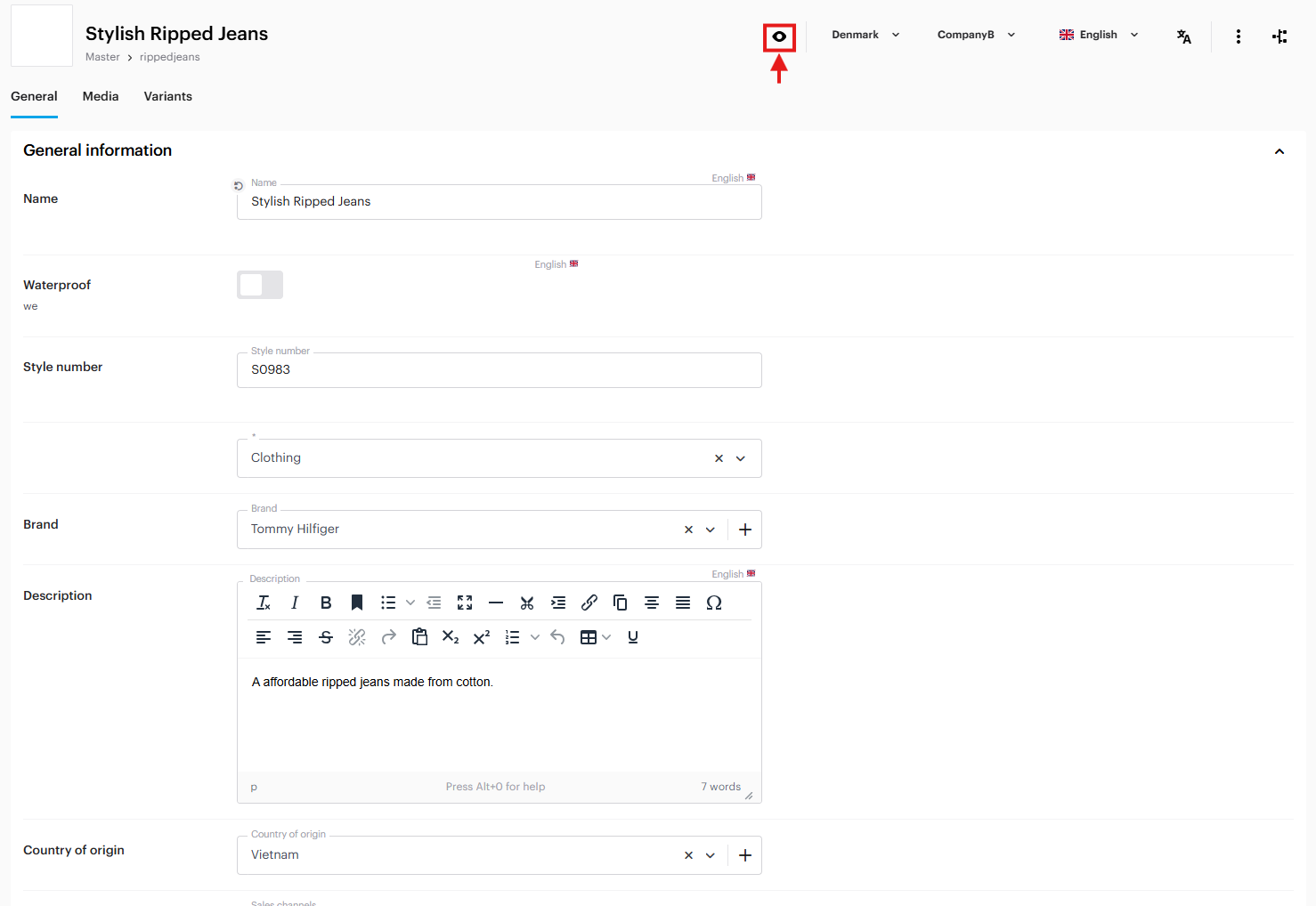
Now lets say we want to watch some products so that you are notified if changes are made t othem. In this case we want to be notified when the product, "Stylish Ripped Jeans", is changed. <br>

<figure><img src="https://2141378775-files.gitbook.io/~/files/v0/b/gitbook-x-prod.appspot.com/o/spaces%2FuUonpFWM7AJ0xVVXV1tr%2Fuploads%2FGZLui07BmqRVX4ZN6vRV%2Fimage.png?alt=media&#x26;token=56a07009-cb37-494e-99cd-b85052cd03c2" alt=""><figcaption><p>Example of product that is not being watched</p></figcaption></figure>

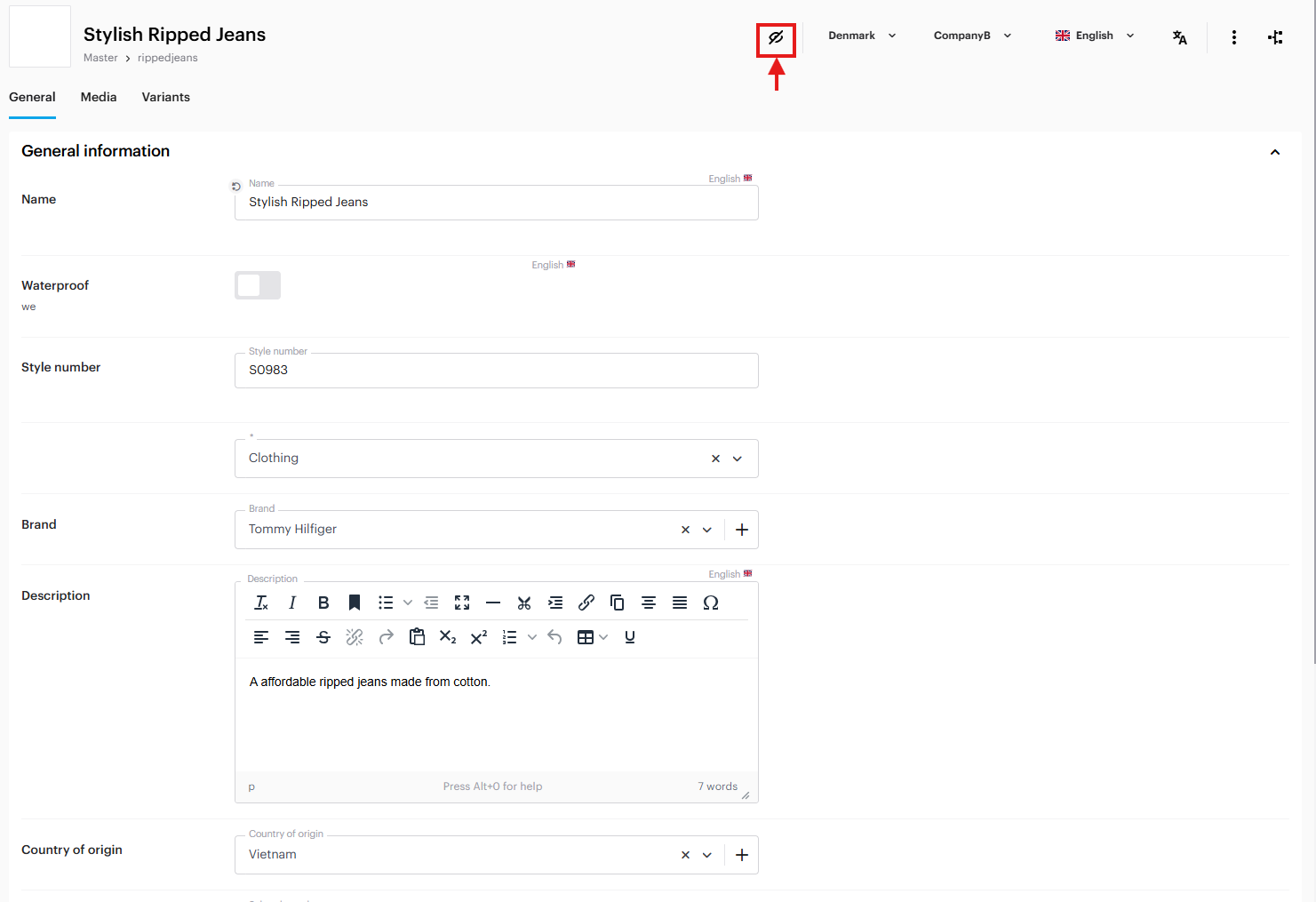
By clicking on the <i class="fa-eye">:eye:</i>-icon on the top of the page shown in the image above, you can choose between watch and unwatch on an entity, in this case a product. Once enabled the icon will turn into <i class="fa-eye-low-vision">:eye-low-vision:</i> and if you press it again you will unwatch the entity.&#x20;

<figure><img src="https://2141378775-files.gitbook.io/~/files/v0/b/gitbook-x-prod.appspot.com/o/spaces%2FuUonpFWM7AJ0xVVXV1tr%2Fuploads%2Fdln8VrF7YWJ44e8hj7WS%2Fimage.png?alt=media&#x26;token=6b93fca1-1d70-471c-845b-75e7db465366" alt=""><figcaption><p>Example of product that is being watched</p></figcaption></figure>

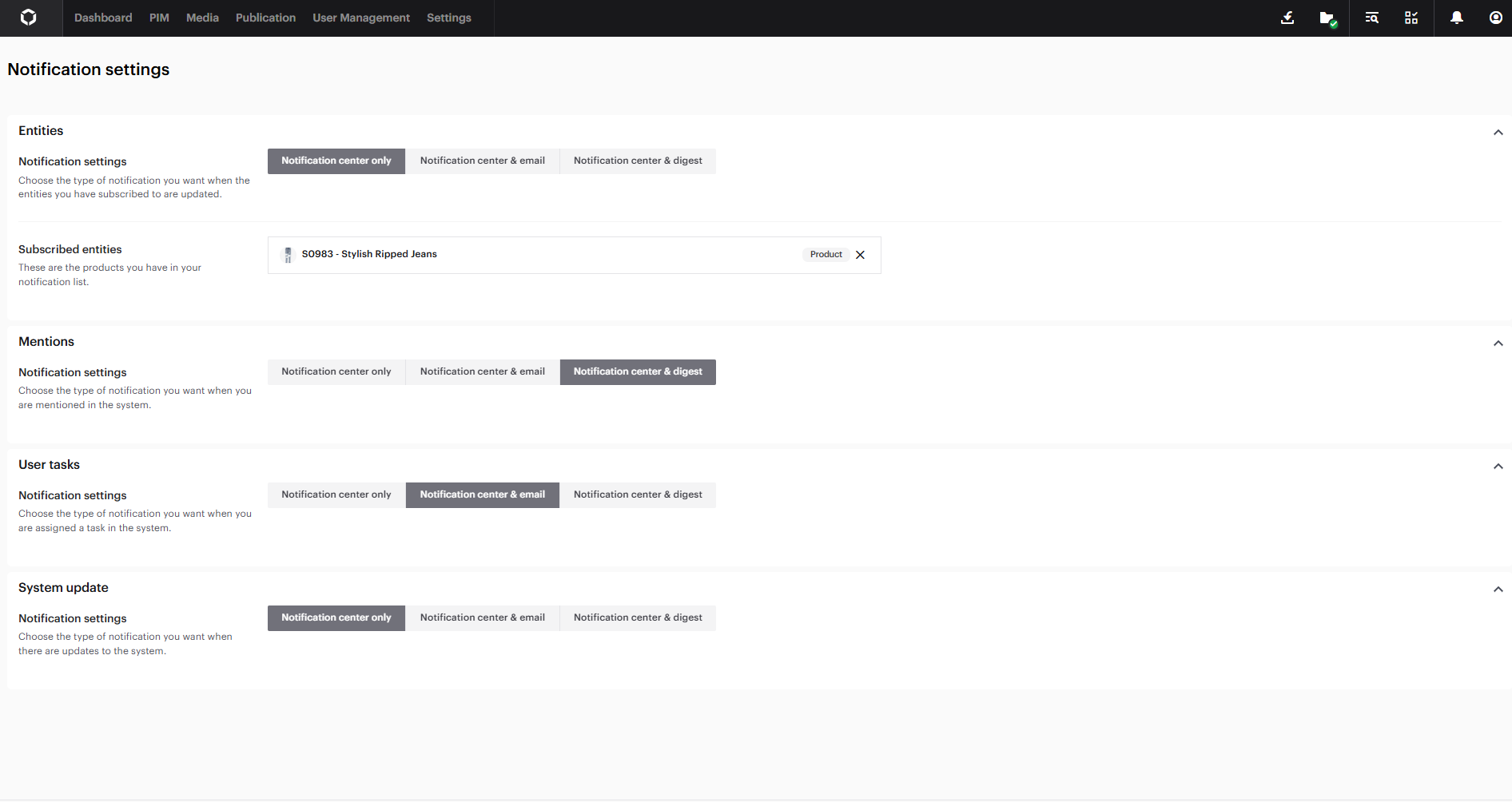
Having watched the product, "Stylish Ripped Jeans", we can now go back to the notification center. Under 'Watched entities' you can see that the product has appeared.

<figure><img src="https://2141378775-files.gitbook.io/~/files/v0/b/gitbook-x-prod.appspot.com/o/spaces%2FuUonpFWM7AJ0xVVXV1tr%2Fuploads%2FVGE7cioiBl6biIOg0DKl%2Fimage.png?alt=media&#x26;token=30b21840-0a7f-4bc9-99e8-52951faf166d" alt=""><figcaption><p>Example of notification settings when subscribed to an entity</p></figcaption></figure>

If the subscribed entity is changed, you will receive a notification. You can see that you have new notifications by looking at the badge of the <i class="fa-bell">:bell:</i>-icon, the number in the badge will show the amount of new notifications.

<figure><img src="https://2141378775-files.gitbook.io/~/files/v0/b/gitbook-x-prod.appspot.com/o/spaces%2FuUonpFWM7AJ0xVVXV1tr%2Fuploads%2FQDtFN7JobWCYqPWFBC2u%2Fimage.png?alt=media&#x26;token=edf2aa2f-2264-4d6a-ad47-8338eff5f250" alt=""><figcaption><p>Example of notification</p></figcaption></figure>

When you click on the  <i class="fa-bell">:bell:</i>-icon you will be presented with the received notification.&#x20;

<figure><img src="https://2141378775-files.gitbook.io/~/files/v0/b/gitbook-x-prod.appspot.com/o/spaces%2FuUonpFWM7AJ0xVVXV1tr%2Fuploads%2FIxaUqsRD5cp026DL5Yxm%2Fimage.png?alt=media&#x26;token=46bd54c6-169e-4d94-956a-71700383f7bb" alt=""><figcaption><p>New notification in the notification menu</p></figcaption></figure>

## Receiving notifications when mentioned

In the following example we want to be notified in the notification center and receive a digest in the mail, when we are mentioned in the system. Since we could be mentioned multiple times, it would be preferable to receive a digest rather than multiple emails.

<figure><img src="https://2141378775-files.gitbook.io/~/files/v0/b/gitbook-x-prod.appspot.com/o/spaces%2FuUonpFWM7AJ0xVVXV1tr%2Fuploads%2FZkCFxnren0ijqWKL3SF7%2Fimage.png?alt=media&#x26;token=44390235-d585-46fa-bff2-5b078dd2698b" alt=""><figcaption><p>Example of notification settings</p></figcaption></figure>

In the image below, a user is mentioning Kim in a task by adding "@" before the name. This is done on the task details page after selecting an existing task from the task overview page by clicking on it. Once the message is written, the user clicks the "Send"-button, and Kim will receive a notification of the mention.

<figure><img src="https://2141378775-files.gitbook.io/~/files/v0/b/gitbook-x-prod.appspot.com/o/spaces%2FuUonpFWM7AJ0xVVXV1tr%2Fuploads%2FrRW0NSvq6uhrWW45irw8%2Fimage.png?alt=media&#x26;token=d733305c-b00e-49cb-8859-22a4da0dada7" alt=""><figcaption><p>Mention in a note</p></figcaption></figure>

Below you can see the mention notification in the notifications center.

<figure><img src="https://2141378775-files.gitbook.io/~/files/v0/b/gitbook-x-prod.appspot.com/o/spaces%2FuUonpFWM7AJ0xVVXV1tr%2Fuploads%2FampYxmNubQ7buwABjlQf%2Fimage.png?alt=media&#x26;token=47590678-c144-498c-b4e5-94e321ea844a" alt=""><figcaption><p>Notification of mention</p></figcaption></figure>

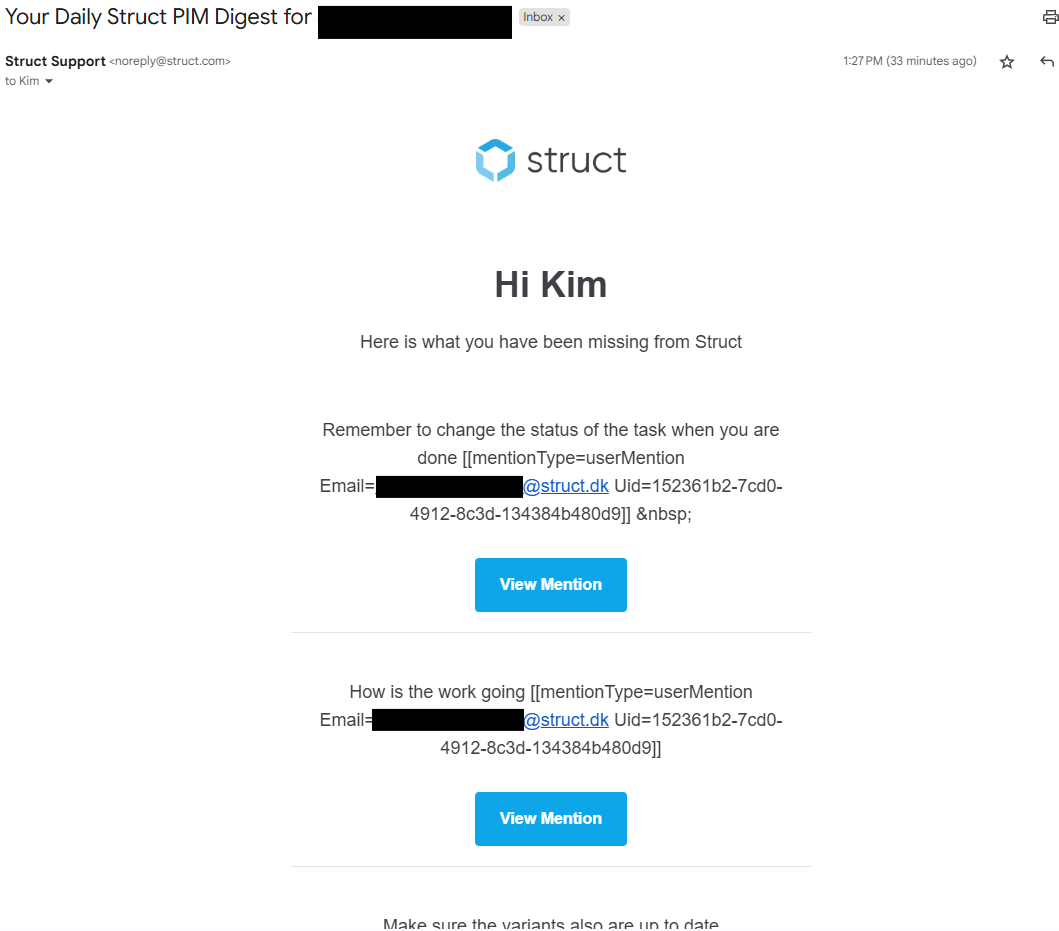
By selecting the digest option in notification settings, you will receive an email summarizing all your mentions. This allows you to stay updated even when you're not on the PIM. A digest will be sent to you daily.

<figure><img src="https://2141378775-files.gitbook.io/~/files/v0/b/gitbook-x-prod.appspot.com/o/spaces%2FuUonpFWM7AJ0xVVXV1tr%2Fuploads%2FDSNjZvs7CgDRihIiEgCf%2Fimage.png?alt=media&#x26;token=6c62f080-b4bf-49cd-b079-c5c691243907" alt=""><figcaption><p>Notification digest</p></figcaption></figure>

## User task notifications

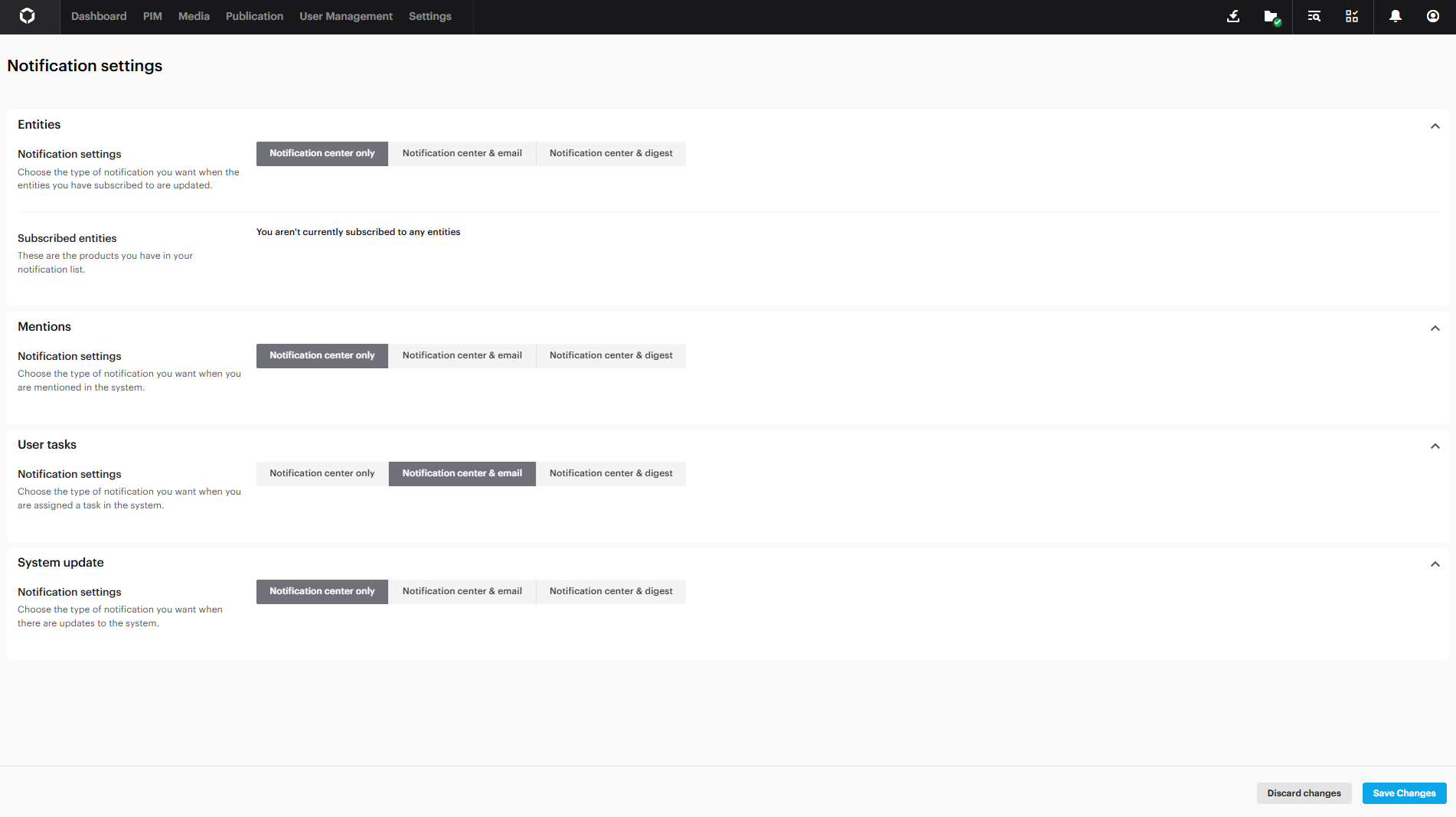
To ensure we stay updated on our tasks and do not miss deadlines, we decide to receive notifications in the notification center and via email when a task is assigned to us.

<figure><img src="https://2141378775-files.gitbook.io/~/files/v0/b/gitbook-x-prod.appspot.com/o/spaces%2FuUonpFWM7AJ0xVVXV1tr%2Fuploads%2FZkCFxnren0ijqWKL3SF7%2Fimage.png?alt=media&#x26;token=44390235-d585-46fa-bff2-5b078dd2698b" alt=""><figcaption><p>Notification settings</p></figcaption></figure>

When [setting up a task](https://docs.struct.com/tutorials/guides/how-to-use-tasks/how-to-set-up-and-edit-a-task), you assign tasks to a user by setting them as responsible. In the example below we have set the user "Kim Daniel" as responsible for the following task "Enrich product".&#x20;

<figure><img src="https://2141378775-files.gitbook.io/~/files/v0/b/gitbook-x-prod.appspot.com/o/spaces%2FuUonpFWM7AJ0xVVXV1tr%2Fuploads%2FNLBD2hcutlpJAR5fFWjX%2Fimage.png?alt=media&#x26;token=99f4400e-3a10-4b37-8fe9-d09084c07dfe" alt=""><figcaption><p>User assigned as responsible to user task</p></figcaption></figure>

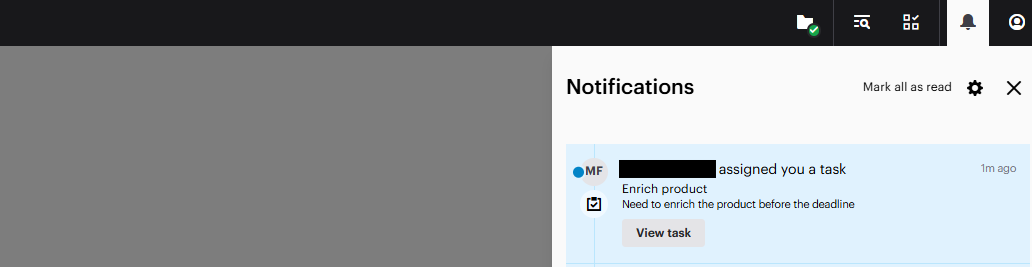
Once the task has been assigned you will be notified in your notification center.

<figure><img src="https://2141378775-files.gitbook.io/~/files/v0/b/gitbook-x-prod.appspot.com/o/spaces%2FuUonpFWM7AJ0xVVXV1tr%2Fuploads%2F4cCG6KHsRYlY7qMhSIoG%2Fimage.png?alt=media&#x26;token=012afe8b-569f-40ad-8bba-7469539be75f" alt=""><figcaption><p>User task notification</p></figcaption></figure>

You will also recieve a notification in your email if the option is enabled in notification settings.

<figure><img src="https://2141378775-files.gitbook.io/~/files/v0/b/gitbook-x-prod.appspot.com/o/spaces%2FuUonpFWM7AJ0xVVXV1tr%2Fuploads%2FUy32ildIF79AknrBpAUX%2Fimage.png?alt=media&#x26;token=100ba599-964b-4a85-8a32-f95982f7df74" alt=""><figcaption><p>Notification email</p></figcaption></figure>

## System update notification

This notification will be triggered once an update has been made to the PIM system. This will keep you updated on new features and updates made to Struct PIM v4.