> For the complete documentation index, see [llms.txt](https://docs.struct.com/llms.txt). Markdown versions of documentation pages are available by appending `.md` to page URLs; this page is available as [Markdown](https://docs.struct.com/tutorials/guides/how-to-use-enrichment-insights/examples-of-enrichments.md).
# Examples of enrichments
Looking for ways to utilize enrichments? Below are some common use cases to inspire you.
### Examples in this guide
1. [#setting-up-basic-content-enrichment](#setting-up-basic-content-enrichment "mention")
2. [#setting-up-ready-for-web-enrichment](#setting-up-ready-for-web-enrichment "mention")
### Setting up basic content enrichment
Most [products](/fundamental-concepts/data-management.md) have titles, descriptions and images. Making sure that you do not release [products](/fundamental-concepts/data-management.md) without these is are good idea.
Go to 'Settings' > 'Enrichment Insights', click 'Create enrichment insight' in the top right corner.
Enrichment insights page
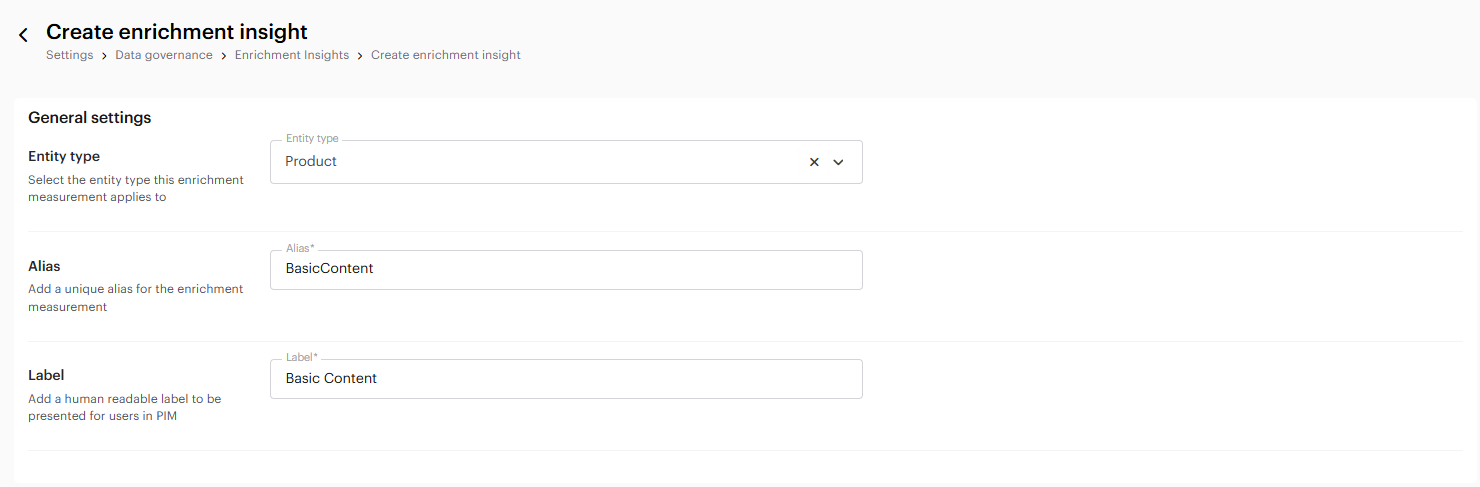
This will open up the 'Create enrichment insight'-page. Here you must specify an entity type, alias and a label. For this example, we will select 'Product' as our entity type.
Next up is the alias and label. We will name our enrichment 'Basic Content'. So our alias will be 'BasicContentEnrichment', and our label will be 'Basic Content'. It is a good idea to give the alias the same name as the label, but concatenated since alias can not contain spaces.
Create enrichment page
When you have filled out the entity type, alias and label, you can go ahead and add rules to the enrichment by clicking 'Add new rule'. This is where we specify what the scope of the enrichment should be.
We select the 'Entities in specific category', and then click on the 'Primary catalogue'. This makes sure that the enrichment is applied to all of our [products](/fundamental-concepts/data-management.md). Clicking 'Next' will take you to the field selector page.
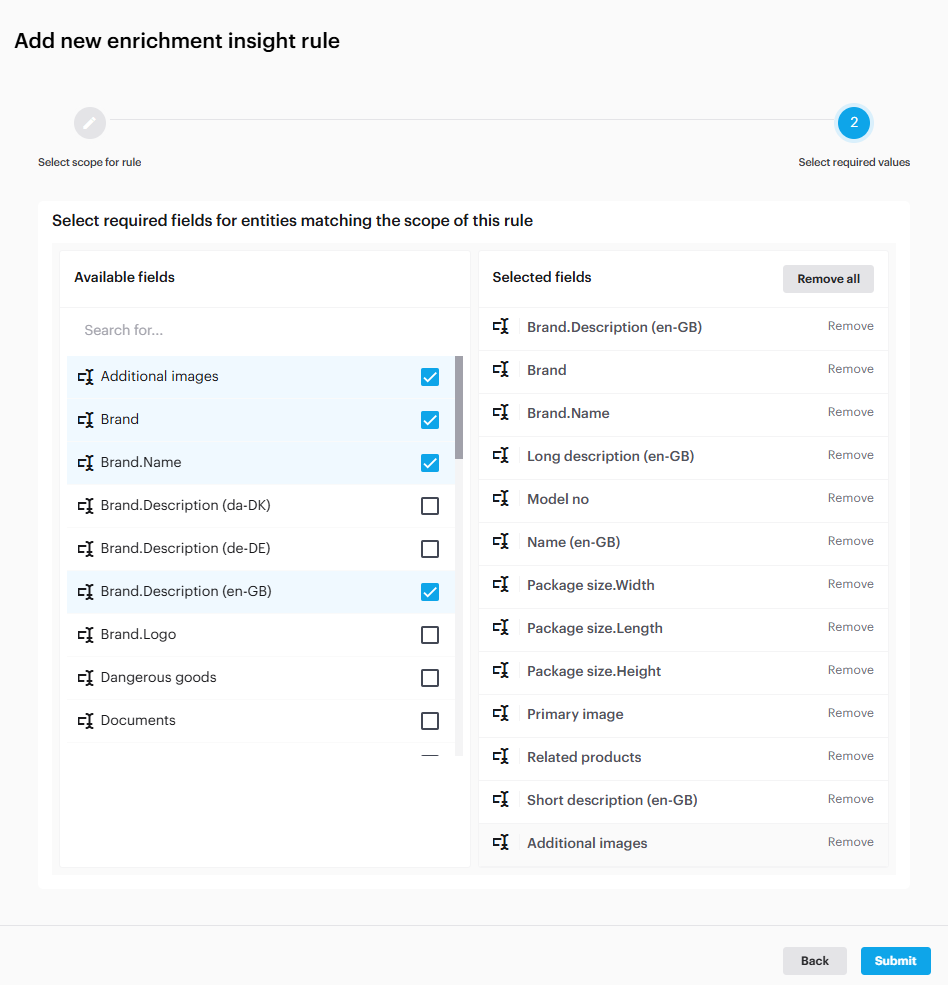
Field selector
This is where you select the fields that are required to be filled out for a 100% enrichment. As we mentioned above, we want to make sure that our [products](/fundamental-concepts/data-management.md) have at least an image, a name and a description. Click 'Submit' when you have specified all the fields required within the enrichment.
When you're ready, you can go ahead and save it. This will apply the enrichment to all exisiting and future [products](/fundamental-concepts/data-management.md) within the PrimaryCatalogue.
Lets check it out. Go to 'PIM' > 'Search'. In the left side menu you can add a filter to the view. You can see how to do this in [How to calculate enrichment for specific categories only](/tutorials/guides/how-to-use-enrichment-insights/how-to-calculate-enrichment-for-specific-categories-only.md).
Selecting the 'Completeness: Basic Content' lets you see [products](/fundamental-concepts/data-management.md) with the specified enrichment percentage.
'Search'-page, products filtered by enrichment completeness
### Setting up 'Ready For Web' enrichment
If you have a website showcasing your [products](/fundamental-concepts/data-management.md), you might want to control when these [products](/fundamental-concepts/data-management.md) appear online. With enrichment insights, setting a readiness threshold is straightforward. You can even define business rules and workflow states to automatically mark a product as 'Ready to be released' once it is 100% enriched.
To begin, navigate to 'Settings' > 'Enrichment Insights', and click '+ Create enrichment insight'.
Enrichment insights page
First make sure that 'Product' is the selected entity type for this enrichment. Next give it an alias and a label. Remember that a good rule of thumb is to use a concatenation of the label as alias, as this makes it easy to identify the enrichment insight.
When you have filled out the entity type, alias, and label go ahead and click '+ Add new rule' to start defining the enrichment scope.
On the rule setup page, you will have to specifiy what entities to apply the rule to. Select 'Entities in specific category' and mark the [category](/fundamental-concepts/data-model.md) you would like to add to the scope of this enrichment.
{% hint style="info" %}
You can create a category for products that are supposed to be displayed on the website. If you do not have that, you can just select the Primary catalogue as the category.
{% endhint %}
When you have specified the entity type and the [category](/fundamental-concepts/data-model.md), click 'Next'. This opens the field selector page, allowing you to choose the required fields for 100% completion. We will select the fields we consider important for an ecommerce website.
When you are satisfied, click 'Submit', and save the enrichment insight. This will apply the enrichment to all existing [products](/fundamental-concepts/data-management.md) within its scope.
Now, you will be able to filter the [products](/fundamental-concepts/data-management.md) by completeness and missing data on the 'Search page'.
{% hint style="info" %}
To read more about filtering by enrichment values, check out this guide: [How to filter entities by current enrichment value](/tutorials/guides/how-to-use-enrichment-insights/how-to-filter-entities-by-current-enrichment-value.md)
{% endhint %}
---
# Agent Instructions
This documentation is published with GitBook. GitBook is the documentation platform designed so that both humans and AI agents can read, navigate, and reason over technical content effectively. Learn more at gitbook.com.
## Querying This Documentation
If you need additional information that is not directly available in this page, you can query the documentation by asking a question.
Perform an HTTP GET request on the following URL with the `ask` and `goal` query parameters:
```
GET https://docs.struct.com/tutorials/guides/how-to-use-enrichment-insights/examples-of-enrichments.md?ask=&goal=
```
`ask` is the immediate question: it should be specific, self-contained, and written in natural language.
`goal` is what the user is ultimately trying to achieve, the reason they need the answer. Sharing it helps GitBook give you a better, more relevant answer. A goal is most helpful when it describes the outcome the user wants rather than restating the question. For example, with `ask=how do I create an API token`, a goal like `automate deployments from our CI pipeline` lets GitBook tailor the answer to that use case.
The response will contain a direct answer to the question and relevant excerpts and sources from the documentation.
Use this mechanism when the answer is not explicitly present in the current page, you need clarification or additional context, or you want to retrieve related documentation sections.