> For the complete documentation index, see [llms.txt](https://docs.struct.com/llms.txt). Markdown versions of documentation pages are available by appending `.md` to page URLs; this page is available as [Markdown](https://docs.struct.com/pim3/tutorials/helpful-guides/how-to-use-import/how-to-import-products.md).
# How to import products
Learn how to import products from beginning to end
## Before importing
A prerequisite to importing any entities is having an excel spreadsheet with the data organized in named columns. For this tutorial we have a made a simple spreadsheet containing information about clothing.
Excel spreadsheet with headers and data
## Starting the import
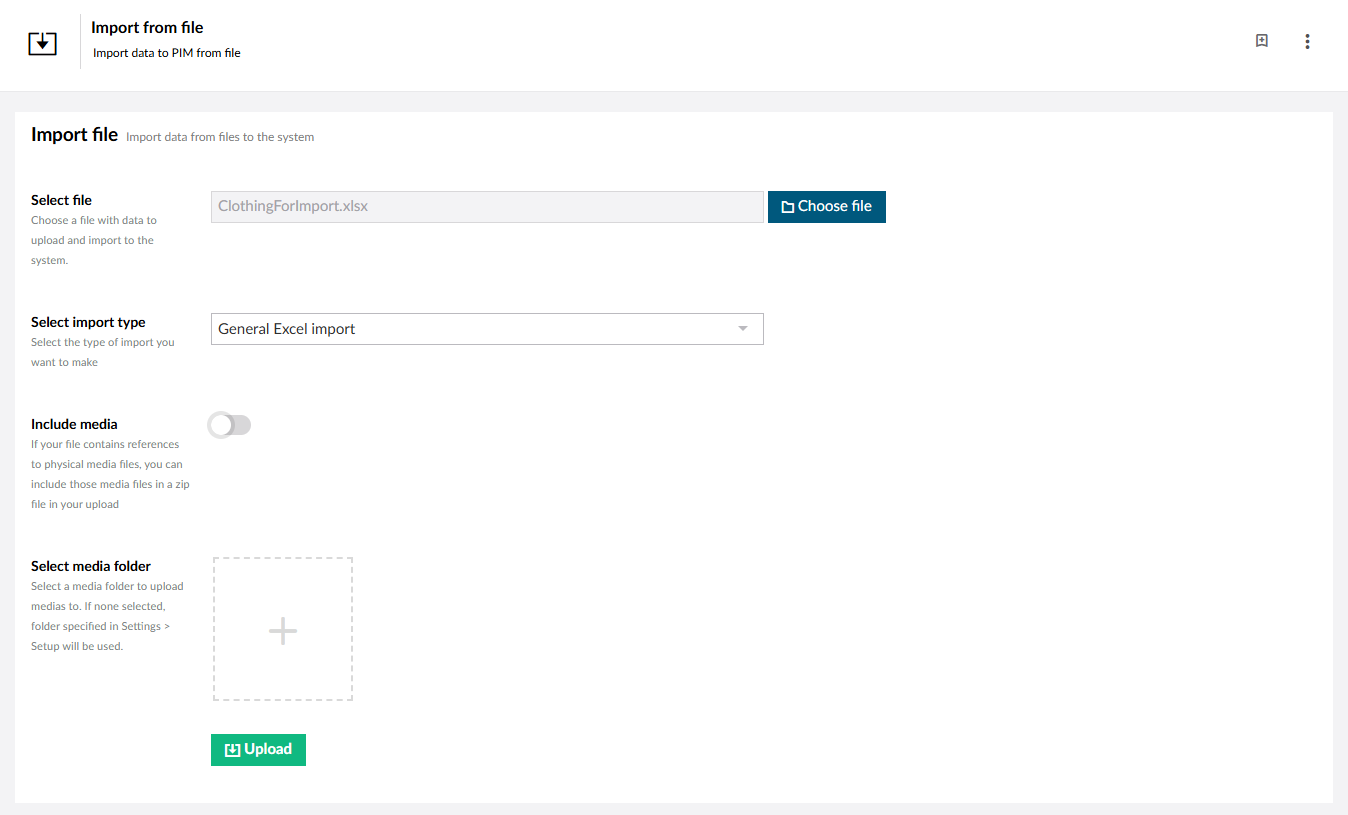
To start importing you choose the excel spreadsheet with the data you want to import, in this tutorial the spreadsheet is called "ClothingForImport.xlsx".
Next you need to choose the correct Import type. When importing [categories](/pim3/fundamental-concepts/catalogues-and-categories.md), [products, variants](/pim3/fundamental-concepts/products-and-variants.md), variant groups or [global lists](/pim3/fundamental-concepts/global-lists.md) the 'General Excel Import' type is used.
While it is possible to include media assets when importing, this will not be covered in this guide. For this reason we leave 'Include media' unticked and 'Select media folder' empty.
Import page
Having chosen the correct file and import type you can click the "Upload"-button to start the import.
## Mapping your data
Having clicked the "Upload"-button you are presented with a new page. This is where you will map your excel columns to data fields on entities.
You will need to choose the correct Entity type; [Categories](/pim3/fundamental-concepts/catalogues-and-categories.md), [Products, Variants](/pim3/fundamental-concepts/products-and-variants.md), Variant groups or [Global list](/pim3/fundamental-concepts/global-lists.md) values.
In this guide we are importing [products](/pim3/fundamental-concepts/products-and-variants.md), so we choose 'Products' in the 'Entity type' dropdown, but the process for all entities are almost entirely similar from here.
Data mapping
Next is mapping the actual data. The import function will try to automap the data from the file by matching the name of the excel column to the name of an [attribute](/pim3/fundamental-concepts/attributes.md) in the PIM.
This is not always possible or what you want, in which case you can manually select the correct [attribute](/pim3/fundamental-concepts/attributes.md) to map to in the 'Select field' dropdown in the 'Map to' column.
Data mapping
Having finished the mapping, you need to choose one or more keys. These key(s) will act as keys to match existing entities in the system. If the key(s) match a [product](/pim3/fundamental-concepts/products-and-variants.md) in the system, that [product](/pim3/fundamental-concepts/products-and-variants.md) will be updated with the data from the excel spreadsheet.
If the key does not exist, a new [product](/pim3/fundamental-concepts/products-and-variants.md) with the data from the excel spreadsheet will be created.
{% hint style="info" %}
If you know you will be using this mapping often, you can save it by clicking 'Save mapping' and giving it a name. This way you can always load your mapping again when using a similar excel spreadsheet.
{% endhint %}
Having chosen one or more keys you can click "Next" in the right-bottom corner.
## The file contains new products
As mentioned in the last section, if a key does not already exist in the PIM, a new [product](/pim3/fundamental-concepts/products-and-variants.md) will be created. If the excel spreadsheet contains new [products](/pim3/fundamental-concepts/products-and-variants.md) you will be prompted to choose a [Product structure](/pim3/fundamental-concepts/product-structures.md) to use for the new [products](/pim3/fundamental-concepts/products-and-variants.md).
The file contains new products
In this guide we are importing clothing, so the 'Clothing' [product structure](/pim3/fundamental-concepts/product-structures.md) is chosen.
Click the "Next"-button in the right-bottom corner to continue.
## Approve changes
At this point you are shown a 'Review changes'-page. This page will show you the amount of new and updated items. New items will be denoted by having a blue 'New'-tag in the key column whereas existing [products](/pim3/fundamental-concepts/products-and-variants.md) will show their current value.
[Attributes](/pim3/fundamental-concepts/attributes.md) that will be changed are colored green to easily distinguish between [attributes](/pim3/fundamental-concepts/attributes.md) that will remain the same and [attributes](/pim3/fundamental-concepts/attributes.md) that will change.
Review changes
Having reviewed the changes you can choose to approve the changes you are satisfied with. Only approved records will be commited.
When you have approved the records you want to keep, click the "Commit Import"-button in the bottom-right corner to finalize the import.
---
# Agent Instructions
This documentation is published with GitBook. GitBook is the documentation platform designed so that both humans and AI agents can read, navigate, and reason over technical content effectively. Learn more at gitbook.com.
## Querying This Documentation
If you need additional information that is not directly available in this page, you can query the documentation by asking a question.
Perform an HTTP GET request on the following URL with the `ask` and `goal` query parameters:
```
GET https://docs.struct.com/pim3/tutorials/helpful-guides/how-to-use-import/how-to-import-products.md?ask=&goal=
```
`ask` is the immediate question: it should be specific, self-contained, and written in natural language.
`goal` is what the user is ultimately trying to achieve, the reason they need the answer. Sharing it helps GitBook give you a better, more relevant answer. A goal is most helpful when it describes the outcome the user wants rather than restating the question. For example, with `ask=how do I create an API token`, a goal like `automate deployments from our CI pipeline` lets GitBook tailor the answer to that use case.
The response will contain a direct answer to the question and relevant excerpts and sources from the documentation.
Use this mechanism when the answer is not explicitly present in the current page, you need clarification or additional context, or you want to retrieve related documentation sections.