> For the complete documentation index, see [llms.txt](https://docs.struct.com/llms.txt). Markdown versions of documentation pages are available by appending `.md` to page URLs; this page is available as [Markdown](https://docs.struct.com/changelog/september-2026.md).
# September 2026
September adds faster media access, improved user defaults, flexible variant classification, and practical workflow improvements across Struct PIM.
September focuses on giving teams faster access to product information and more control over their workspace. You can now classify variants in categories, set default list configurations for user groups, and open asset images directly from product tables.
The release also adds federated auto-login through Microsoft Entra ID, helping users reach Struct PIM without an extra sign-in step.
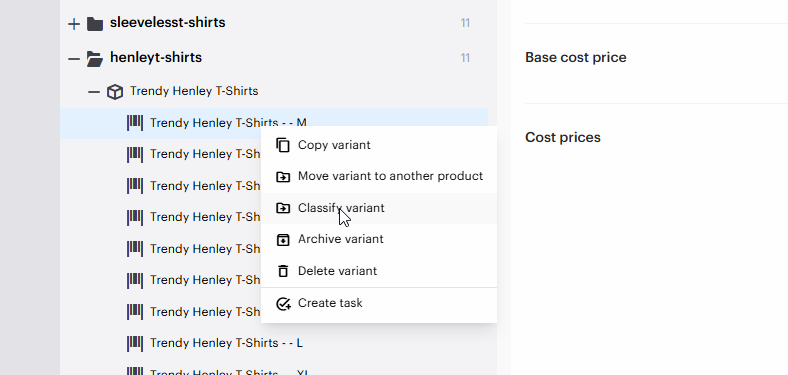
### Classify variants in categories
Variants can now be classified directly in categories. This gives you more flexibility when category membership needs to reflect individual variant characteristics, not only the parent product.
Use this to organize variant-level assortments and make category structures more precise.
### Federated auto-login with Microsoft Entra ID
Struct PIM now supports federated auto-login through Microsoft Entra ID. Users who are already authenticated with Entra ID can be signed in to Struct PIM automatically.
Set up your Entra ID connection and access policies in [How to use Microsoft Entra ID](/tutorials/guides/how-to-use-microsoft-entra-id.md)
### Default list configurations for user groups
Administrators can now define default list configurations for each user group. New users in the group start with the intended list layout, helping teams work consistently from their first sign-in.
Default configurations can also be set for catalogues. Configure them under 'User Management' > 'User groups' > 'Default setup'.
For setup instructions, see our article [How to set up default list configurations for a user group](/tutorials/guides/how-to-work-with-user-management/how-to-set-up-default-list-configurations-for-a-user-group.md)
### Preview asset by hovering over the image
Hover over an image in an entity table to preview the asset and access quick actions. You can maximize the image, download it, or open the asset record without leaving the table. *(SP-2286)*
The same quick actions are now available when hovering over an entity thumbnail in the Entity editor.
### Other improvements in September
* **Shared view settings:** Mark a view setting as shared when creating or updating it. Other users can then use the same view. *(SP-2658)*
* **Substrings in concatenate actions:** Business Rule concatenate patterns can now use part of a value. *(SP-3216)*
* **HTTP actions in transactions:** HTTP Business Rule actions can run inside a PIM transaction. *(SP-2772)*
* **More precise search:** Filters and column searches now use exact matching by default. Add `*` or `!` to use wildcard matching. *(SP-2764)*
* **Find unused assets:** The new **References** system column shows whether an asset is used elsewhere. Use it to identify assets for cleanup. *(SP-2097)*
* **Copy saved searches:** Create a copy of an existing saved search. *(SP-2425)*
* **Copy variant groups:** Duplicate an existing variant group. *(SP-2557)*
* **Clear column searches:** Use the clear icon at the end of a search field to reset it quickly. *(SP-2577)*
* **Find unused global list values:** A new toggle shows only values not referenced anywhere. *(SP-2579)*
* **Select ranges quickly:** Hold `Shift` in list and search views to select a range of entities. *(SP-2645)*
{% hint style="info" %}
**Fun Fact: The Horse in the Elevator Is Here Legally**
In the United States, miniature horses can be trained as service animals. They can guide people, retrieve objects and assist with mobility - performing serious responsibilities while standing roughly the height of a large office printer.
They are intelligent, long-lived and can even be house-trained. So if a tiny horse enters your workplace, remains calm during the fire alarm and appears to know exactly where it is going, it probably has better qualifications than whoever invited it.
Small does not mean incomplete. It just means someone **optimized** the packaging.
**Battle lesson from the Suspiciously Qualified Pony:** *Struct PIM helps you keep even the smallest product details structured, connected and ready to perform - because size is irrelevant when everything important is in the right place.*
*P.S. If the horse asks to see the previous version, let it through. It clearly knows something.* 🐴👀
{% endhint %}
***
### Releases in September
* [September 30th](/changelog/september-2026/september-30th.md)
* [September 22nd](/changelog/september-2026/september-22nd.md)
* [September 15th](/changelog/september-2026/september-15th.md)
* [September 8th](/changelog/september-2026/september-8th.md)
* [September 2nd](/changelog/september-2026/september-2nd.md)
---
# Agent Instructions
This documentation is published with GitBook. GitBook is the documentation platform designed so that both humans and AI agents can read, navigate, and reason over technical content effectively. Learn more at gitbook.com.
## Querying This Documentation
If you need additional information that is not directly available in this page, you can query the documentation by asking a question.
Perform an HTTP GET request on the following URL with the `ask` and `goal` query parameters:
```
GET https://docs.struct.com/changelog/september-2026.md?ask=&goal=
```
`ask` is the immediate question: it should be specific, self-contained, and written in natural language.
`goal` is what the user is ultimately trying to achieve, the reason they need the answer. Sharing it helps GitBook give you a better, more relevant answer. A goal is most helpful when it describes the outcome the user wants rather than restating the question. For example, with `ask=how do I create an API token`, a goal like `automate deployments from our CI pipeline` lets GitBook tailor the answer to that use case.
The response will contain a direct answer to the question and relevant excerpts and sources from the documentation.
Use this mechanism when the answer is not explicitly present in the current page, you need clarification or additional context, or you want to retrieve related documentation sections.